
News
Transform Your Workday: The Ultimate Ultrawide Desk Setup That Supercharges Your Productivity
Tired of cramped setups, tangled cables, and poor lighting? This meticulously designed ultrawide desk configuration combines premium gear with minimalist aesthetics to boost both comfort and output. Whether you’re battling deadlines, editing visuals, or powering through creative work, this guide translates an aspirational setup into your reality.

Mục lục bài viết
- 1. Ultrawide Monitor That Lets You See More
- 2. Eye-Friendly Illumination Right Where You Need It
- 3. Raise Your Monitor & Add Storage
- 4. Superior Peripheral Tools for Productivity
- 5. Keep Your Wrists Happy
- 6. Add Sound and Supplemental Lighting
- 7. Charging Without the Mess
- 8. Desk Protection & Aesthetic
- Step-by-Step Setup Guide
- Pro Tips & Budget-Friendly Alternatives
- Final Thoughts
1. Ultrawide Monitor That Lets You See More
LG 34WN780-B 34″ UltraWide QHD Monitor – The centerpiece. Its 34″ 21:9 display gives expansive screen real estate, letting you multitask seamlessly—no more alt-tabbing between windows. The Ergo adjustable stand enhances posture by letting you extend, tilt, and height-adjust the screen into your ideal position.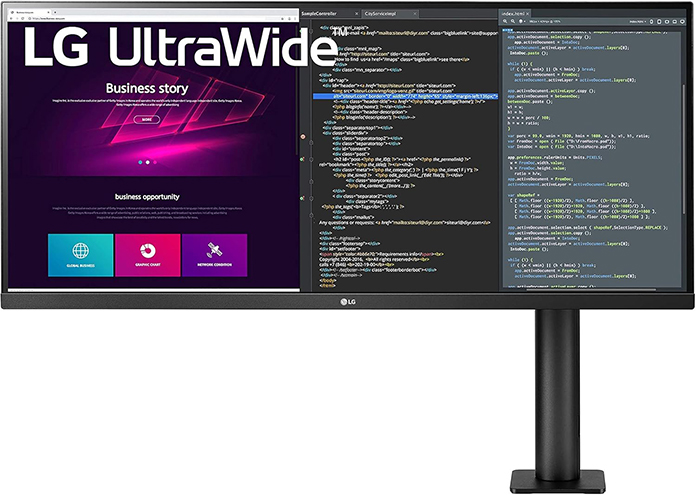
2. Eye-Friendly Illumination Right Where You Need It
Baseus Monitor Light Bar – Clamps atop your monitor for focused, glare-free illumination that lights up your desk—not the screen. With three color modes and simple touch control, it eases eye strain during late-night work sessions.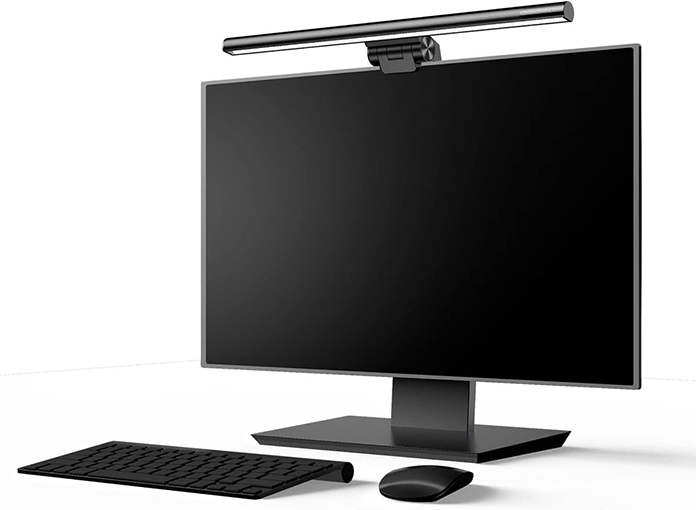
3. Raise Your Monitor & Add Storage
IKEA EKBY Alex Shelf & Drawers – Dual functionality: elevates the ultrawide to eye level and provides hidden storage for cables and small accessories. This saves desk space and keeps your setup looking clean and sleek.
4. Superior Peripheral Tools for Productivity
- Logitech MX Keys Mini – Compact, responsive keyboard with smart backlighting—perfect for typing in dim lighting.
- Logitech MX Master 3 – Ergonomic mouse that reduces wrist strain—ideal for creative workflows or long editing sessions.
5. Keep Your Wrists Happy
Delta Hub Wrist Rest – A plush, supportive cushion that maintains your wrist alignment and ease during long typing or mouse sessions.
6. Add Sound and Supplemental Lighting
- Kanto 2 Speakers – Compact, stylish, and deliver crisp sound.
- IKEA HEKTAR Desk Lamp – Adds a warm glow and industrial vibe for ambient lighting.
7. Charging Without the Mess
Satechi Wireless Charging Pad – Sleek charging station for your phone—just set it down, no cables required.
8. Desk Protection & Aesthetic
Oakywood Felt Desk Pad – A dual-material pad that protects your desk surface and gives your mouse a smooth glide while elevating the visual appeal of your workspace.
Step-by-Step Setup Guide
- Assemble the IKEA shelf and position it centrally; slide the monitor onto it for optimal eye-level viewing.
- Clamp the Baseus Light Bar atop the monitor, centering it to reduce reflections and shadow.
- Place desk pad across the planner area, then arrange keyboard, trackpad, and mouse with wrist support for ergonomic angles.
- Set the wireless charger in reach, route a tidy cable under the desk or behind the shelf.
- Position speakers and desk lamp for even lighting and immersive audio.
- Tidy cables using clips or zip ties behind the monitor and under the shelf to preserve the minimalist look.
Pro Tips & Budget-Friendly Alternatives
- No Ikea shelf? Try inexpensive monitor risers or stack a few sturdy books to get the same ergonomic lift.
- Want a smart light feature? The Quntis ScreenLinear (around $70) offers auto-dimming and a broader color range.
- Short on space? Wireless compact keyboards and vertical mouse options can free more desk area.
- Protect your wrists further with a gel insert inside the desk pad—many come with adhesive and plush support.
Final Thoughts
This walkthrough unlocks a premium, ergonomic ultrawide setup that marries style with performance. Tailor it to your space, workflow, and budget—and watch your productivity soar.